
A free browser stem splitter that separates a song into six parts and turns the player into a practice room, with the audio never leaving the device.
A phone remote for Android TV, Google TV and Roku that talks to the TV over your own Wi-Fi, turns it on, and keeps working without an account.
https://doofer.app
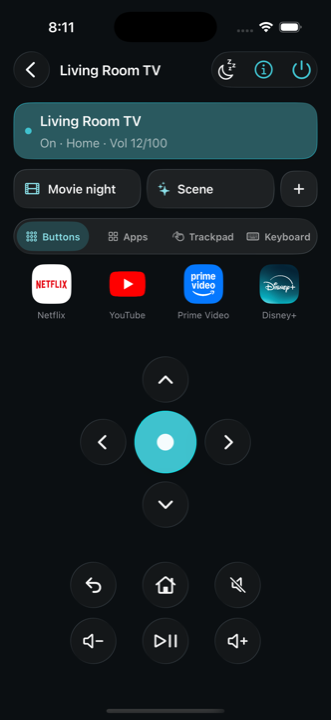
Doofer is named after the British word for the thing you point at the television, and it is built around a single constraint: the remote should keep working when the internet does not. The phone talks to the TV over the local network. Android TV and Google TV use the Android TV Remote protocol v2 — the TV advertises itself over mDNS, pairing is a TLS handshake confirmed with the on-screen code, and commands run over a second port. Roku uses ECP, which needs no pairing at all. Nothing passes through a Doofer server, because there is none.
What it does is the whole job, not a subset. It turns the TV on with Wake-on-LAN from a learned address, pairs in under a minute, and offers the full keypad: D-pad, back, home, volume, mute, media keys, power, haptics and a trackpad. A keyboard opens when the TV focuses a text field, with voice or paste. The remote reads back whether the TV is on, what is playing and the volume number, and a "Why?" button names the likely reason when a connection fails. Lock-screen widgets, a home-screen widget, an Apple Watch app and a Wear OS tile extend it beyond the phone.
The honest limits are published as a section of their own: Samsung, LG and Fire TV are not supported because they use Tizen, webOS or Fire OS; a set that fully sleeps cannot be woken; apps that publish no deep link cannot be opened; and a TV on another network is out of reach. The free tier covers two TVs, one scene and six app buttons; Doofer Pro is £12 once, with local pricing set per country, and includes unlimited scenes, kid and guest mode, sleep timer, Paste to TV and every widget.
People who keep losing the TV remote and want a phone app that works instantly on the same Wi-Fi, without ads or an account.
Turning on an Android TV or Roku from the phone; typing into a TV search field without arrow keys; running a movie-night scene that switches input and volume; keeping a child inside an allowed app list with a PIN; controlling the TV from a watch or a quick-settings tile.
Freemium
| Plan | Price | Billing | Notes |
|---|---|---|---|
| Free | £0 | free | Two TVs, one scene, six app buttons; no ads |
| Doofer Pro | £12 | one-time | Local price set per country; seven-day Pro trial from first TV pairing |
Plan details are shown as published; taxes and regional pricing may differ.
Free tier: two TVs, one scene, six app buttons and a play/pause widget. Doofer Pro is £12 once (local price set per country, Family Sharing where the store supports it), with a seven-day Pro trial counted from the first TV pairing. Available on Google Play now; the iPhone app is still coming.
Pricing and availability last checked: Oct 24, 2026 · Source: official website
Operated by Nativecore Limited in England and Wales. The policy states that the remote talks to the TV locally and that no remote traffic passes through the vendor; optional sign-in with Apple or Google stores a small profile and remote layout in Firebase. Usage analytics is on by default and can be switched off; it records whether a TV model wakes and never TV names, addresses, typed text, viewing history or the advertising identifier. Payments are handled by Apple or Google with RevenueCat checking receipts.
The local-network design is a real reliability advantage over cloud remotes, and the site lists what the app cannot control instead of implying universal support.
No Samsung, LG or Fire TV support, no waking a fully sleeping set, the iPhone app is not released yet, and Roku on Android is still being brought across.
Android TV and Google TV through the Android TV Remote protocol, and Roku through ECP. Samsung, LG and Fire TV are not supported because they use Tizen, webOS or Fire OS.
A single £12 purchase unlocks unlimited scenes, kid and guest mode, every room, twelve app buttons, widgets and watch apps, sleep timer, Paste to TV and blind mode.
No. The remote works over your local Wi-Fi without an account; signing in with Apple or Google is optional and only stores a small profile and the layout of your remote.
Answers are editor-written from verified product details; last checked Oct 25, 2026.
A free browser stem splitter that separates a song into six parts and turns the player into a practice room, with the audio never leaving the device.

A small development studio building SaaS products, MVPs and web apps on SvelteKit, with a public portfolio of eight shipped projects.

A product studio building AI systems, data platforms and enterprise software with founders since 2015.

More than a hundred free browser tools — calculators, converters, study games and text utilities — with no signup.